|
arduino IDEArduino
|
Motor Speed and Direction Control with a Web-Server using an ESP01
Supplies:
For this project, you will need:
- An ESP01 microcontroller(You can use any ESP8266-based microcontroller having at least 2 PWM outputs)
- An ESP01 programmer(If using an ESP01 microcontroller)
- An H-bridge motor driver(There are a lot to choose from, I am using an MX1508 motor driver)
- A DC power source(Voltage depends on the motor)
- A 3.3-volt DC power source(For powering the ESP microcontroller)
- 4 jumper wires(To connect power and inputs of the motor driver to the ESP)
Step 1: Program the Microcontroller

You can learn how to program an ESP01 microcontroller in this video.
You can get the code from here.

Before uploading the code, make sure to put the name and password of your W-Fi Router in the code.
There is an option to enable/disable acceleration/deceleration of the motor, which can be done from this part of the code:

After programming the microcontroller, unplug it from the computer, plug it back in and open the Serial monitor.

Wait for the microcontroller to connect to the Router and then note the IP address shown on the Serial Monitor.
Step 2: Connect the Motor to the Motor Driver

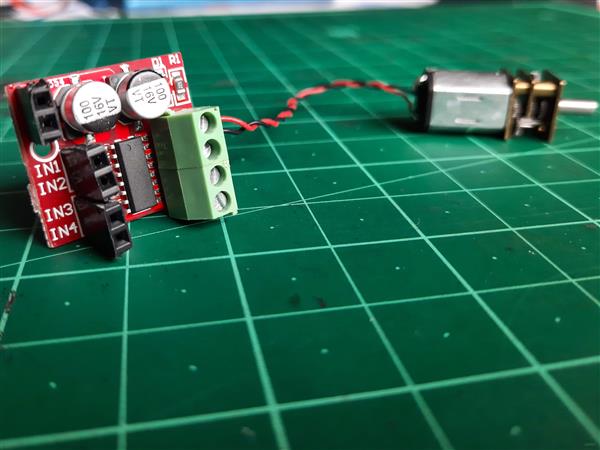
Step 3: Connect the Motor Driver to the ESP microcontroller

Connect the input pins of the motor driver corresponding to the output pins connected to the motor.
The motor driver inputs will be connected to the pins D0 and D2 of the ESP microcontroller.
Step 4: Power up the Setup and Open the Web Interface
After powering up the setup, get the device that you will use for controlling the motor and make sure it is connected to the same router.
After that, enter the IP address that you noted from the serial monitor in the beginning.

Step 5: Check the Controls
Check if your setup is working as shown in the video above.
I hope you enjoyed making this project. I would recommend you to tinker with this project and try adding your own features, all the best!
Motor Speed and Direction Control with a Web-Server using an ESP01






- Comments(1)
- Likes(4)
- 2 USER VOTES
- YOUR VOTE 0.00 0.00

-
9design
-
10usability
-
10creativity
-
10content
-
2design
-
3usability
-
4creativity
-
5content
 More by KushagraK7
-
 Raspberry Pi Pico RC Vehicle
SuppliesA Raspberry Pi Pico(Almost any microcontroller can be used here, but the Pico offers great f...
Raspberry Pi Pico RC Vehicle
SuppliesA Raspberry Pi Pico(Almost any microcontroller can be used here, but the Pico offers great f...
-
 Stepper Motor Controlled Stepper Motor Without Microcontroller!
Step 1: Watch the VideoWatch the video to get a full understanding of the project and learn how to t...
Stepper Motor Controlled Stepper Motor Without Microcontroller!
Step 1: Watch the VideoWatch the video to get a full understanding of the project and learn how to t...
-
 Automated Model Railroad Layout Running Two Trains
I made an Automated Model Train Layout with Passing Siding a while back. Upon request from a fellow ...
Automated Model Railroad Layout Running Two Trains
I made an Automated Model Train Layout with Passing Siding a while back. Upon request from a fellow ...
-
 Program the Raspberry Pi Pico With the Arduino IDE
The Raspberry Pi Pico is a recently launched product in the family of microcontrollers and its load ...
Program the Raspberry Pi Pico With the Arduino IDE
The Raspberry Pi Pico is a recently launched product in the family of microcontrollers and its load ...
-
 Reuse an Old Laptop's Touchpad to Control a Computer!
PS/2 laptop touchpads are among the coolest user interface devices to use with a microcontroller. Th...
Reuse an Old Laptop's Touchpad to Control a Computer!
PS/2 laptop touchpads are among the coolest user interface devices to use with a microcontroller. Th...
-
 Automated Model Railroad Layout With Reverse Loops
In one of my previous projects, I showed how to make a Simple Automated Point to Point Model Railroa...
Automated Model Railroad Layout With Reverse Loops
In one of my previous projects, I showed how to make a Simple Automated Point to Point Model Railroa...
-
 Use a Stepper Motor As a Rotary Encoder
Rotary encoders are great for use in microcontroller projects as an input device but their performan...
Use a Stepper Motor As a Rotary Encoder
Rotary encoders are great for use in microcontroller projects as an input device but their performan...
-
 Keyboard Controlled Model Train(PS/2 Interface)
Using Arduino microcontrollers, there are a lot of ways of controlling model railway layouts. A keyb...
Keyboard Controlled Model Train(PS/2 Interface)
Using Arduino microcontrollers, there are a lot of ways of controlling model railway layouts. A keyb...
-
 Stepper Motor Speed and Direction Control Without a Microcontroller
In one of my previous projects, I showed you how to control a stepper motor's speed using a 555 time...
Stepper Motor Speed and Direction Control Without a Microcontroller
In one of my previous projects, I showed you how to control a stepper motor's speed using a 555 time...
-
 Smartphone Controlled 4X4 Robot With ESP8266
SuppliesFor this project, you will need:An ESP8266 microcontroller(Node MCU)A dual H-bridge motor dr...
Smartphone Controlled 4X4 Robot With ESP8266
SuppliesFor this project, you will need:An ESP8266 microcontroller(Node MCU)A dual H-bridge motor dr...
-
 Touchpad Controlled Digital Servo Motor
Here is a quick and simple project where we control a digital servo motor with the slide of our fing...
Touchpad Controlled Digital Servo Motor
Here is a quick and simple project where we control a digital servo motor with the slide of our fing...
-
 Smartphone Controlled Model Railroad With an ESP8266
IntroA while back, I made a project where a stepper motor's position is controlled using a smartphon...
Smartphone Controlled Model Railroad With an ESP8266
IntroA while back, I made a project where a stepper motor's position is controlled using a smartphon...
-
 Simple USB Volume Controller with Arduino
This project uses a rotary encoder connected to an Arduino Leonardo to control the audio volume of a...
Simple USB Volume Controller with Arduino
This project uses a rotary encoder connected to an Arduino Leonardo to control the audio volume of a...
-
 Motor Speed and Direction Control with a Web-Server using an ESP01
Supplies:For this project, you will need:An ESP01 microcontroller(You can use any ESP8266-based micr...
Motor Speed and Direction Control with a Web-Server using an ESP01
Supplies:For this project, you will need:An ESP01 microcontroller(You can use any ESP8266-based micr...
-
 Wi-Fi Controlled Stepper Motor With an ESP Microcontroller
Step 1: Get All the Required StuffFor this project, you will need:An ESP8266 microcontrollerA Steppe...
Wi-Fi Controlled Stepper Motor With an ESP Microcontroller
Step 1: Get All the Required StuffFor this project, you will need:An ESP8266 microcontrollerA Steppe...
-
 Simple Automated Model Railroad Loop With Yard Siding
Video:Supplies: For this project, you will require:An Arduino microcontroller board compatible with ...
Simple Automated Model Railroad Loop With Yard Siding
Video:Supplies: For this project, you will require:An Arduino microcontroller board compatible with ...
-
 Laptop Touchpad Controlled Model Railroad
Supplies:For this project, you will require:An Arduino microcontroller compatible with Adafruit Moto...
Laptop Touchpad Controlled Model Railroad
Supplies:For this project, you will require:An Arduino microcontroller compatible with Adafruit Moto...
-
 Control a Stepper Motor with a Slide of Your Finger
Supplies:An Arduino microcontroller boardA PS/2 touchpad from a laptop(Try to get one with a Synapti...
Control a Stepper Motor with a Slide of Your Finger
Supplies:An Arduino microcontroller boardA PS/2 touchpad from a laptop(Try to get one with a Synapti...
-
-
-
-
Tester for Touch Screen Digitizer without using microcontroller
321 2 2 -
Audio reactive glow LED wristband/bracelet with NFC / RFID-Tags
306 0 1 -
-
-